
Why Fake Trading Screenshots Are Popular Among Influencers
In the fast-paced world of online trading and finance, influencers continuously seek ways to boost credibility and attract more followers. One surprising yet widespread practice is the use of fake trading screenshots. But why exactly do so many influencers resort to this, and what does it mean for the integrity of the trading community? Let’s dive deep into this phenomenon, exploring the psychology behind it, its risks, and how modern tools can promote transparency instead.

The Allure of Visual Proof in Trading
Trading is a highly specialized activity, often shrouded in complexity and uncertainty. For novices or those outside the financial sector, figures, charts, and trade performance can seem abstract, if not intimidating. This is where visuals become a powerful communication tool. A clean, professional screenshot of a successful trade or an impressive portfolio makes the results tangible and instantly understandable.
For educators and signal sellers, showcasing these visuals:
- Builds trust by providing apparent proof of expertise.
- Enhances engagement by simplifying complex information.
- Drives conversions by motivating followers to buy signals or subscribe to courses.
But what happens when these screenshots are fabricated or manipulated?
Why Do Influencers Resort to Fake Screenshots?
At first glance, creating authentic trade screenshots is straightforward: just capture what’s on your platform. Yet, the realities are often different. Here are some driving factors behind this trend:
- Pressure to Impress Quickly. The trading niche is ultra-competitive. Influencers have mere seconds to convince a new visitor they are credible. High-quality screenshots showing consistent profits serve as social proof. Creating these from scratch or embellishing data can be tempting.
- Lack of Actual Profitable Trades. Many aspiring traders or educators may not have a long track record to display. Instead of risking showing small gains or losses, they fabricate success stories to align with market demand.
- Enhanced Branding and Aesthetics. Default platform screenshots can be cluttered or messy. Influencers often want polished, clean visuals that stand out on Instagram or YouTube. Editing or outright fabricating images helps meet these aesthetic goals.
- Psychological Leverage. Followers often rely on heuristics — quick mental shortcuts — to decide whom to trust. Showing winning trades creates the illusion of mastery, encouraging users to engage without deeper scrutiny.
- Monetary Incentives. Signal selling and educational products represent substantial revenue streams. Inflating one’s apparent success can drive more sales and higher prices.

The Risks and Consequences of Fake Trading Screenshots
While fabricating trading results might look tempting, it carries serious risks:
- Reputational Damage: Once exposed, fake screenshots can ruin an influencer’s credibility overnight. The trading community is tight-knit and highly critical of dishonesty.
- Legal Issues: Some jurisdictions consider deceptive marketing practices illegal, especially if followers lose money based on false performance claims.
- Harming Followers: Investors who trust fake results may face financial losses, damaging trust in the entire education or signal-selling ecosystem.
- Undermining the Community: The proliferation of fake results contributes to skepticism towards all genuine traders and educators.
“Authenticity is the anchor of long-term success in trading education. Once you lose trust, no amount of marketing can bring it back.” – Anonymous trading educator
How to Spot Fake Trading Screenshots
For followers aiming to protect themselves, being vigilant is key. Here are some red flags:
– Inconsistent timestamps or illogical trade sequences
– Overly perfect, “too good to be true” profit percentages
– Screenshots lacking basic platform UI elements or containing suspicious overlays
– Trades showing unrealistically quick large gains without any drawdowns
– Lack of third-party verification or independent audit
Remember, even skilled traders have losses and setbacks—that’s part of the journey.

A Better Alternative: Professional, Authentic Screenshots
Rather than resorting to deception, influencers and educators can leverage modern tools designed to enhance transparency without compromising visuals. This is where solutions like Trading Screenshot Generator come in.
This innovative web tool allows users to create high-quality, customized screenshots directly from the MetaTrader platform, preserving authenticity while improving presentation. Features include:
- Clean and Professional Design: Easily remove clutter, highlight key trades, and add educational commentary.
- Customization Options: Match your branding colors and styles without altering actual trade data.
- Quick and User-Friendly: Generate visuals in seconds without complicated editing software.
- Boost Trust: Authentic, polished screenshots inspire confidence among followers and potential customers.
By embracing tools that emphasize honesty and professionalism, trading influencers can build a sustainable brand that stands out in the crowded financial space.
The Ethics of Trading Education and Visual Proof
Trading education should prioritize empowerment over gimmicks and quick wins. Visual proof like screenshots can be educational when used transparently:
– Illustrating trade setups and strategies realistically
– Showing both winning and losing trades to provide balanced learning
– Highlighting risk management principles and lesson takeaways
Authentic engagement builds a true community of learners and investors, rather than mere followers chasing illusions.

In Summary: Towards More Honest Trading Content
The popularity of fake trading screenshots among influencers can largely be traced back to the pressure to appear successful, the desire for quick growth, and the monetization potential in the education and signal-selling space. However, these short-term gains carry the risk of damaging reputations, misleading followers, and undermining the community.
Thankfully, embracing authenticity with the help of smart tools like the Trading Screenshot Generator offers a path forward. By presenting genuine results in an appealing, professional way, influencers and educators can foster trust, build lasting brands, and contribute to a healthier trading ecosystem.
So, if you’re a trading educator, signal seller, or financial influencer looking to elevate your visual content the right way, why not give it a try? It only takes a few clicks to start creating powerful, authentic trading screenshots that truly resonate with your audience.

Why Combining Screenshots and Audio Elevates Your Podcast Visual Content
In the crowded world of financial education, trading signals, and investment influencing, standing out requires more than just great audio content. But have you ever wondered how to make your podcast episodes resonate more visually, without burdening yourself with complex video editing software?
Imagine this: You’re discussing a recent trade, explaining your entry, exit, and rationale. Your audience listens intently, but what if they could also see a crisp, professional screenshot of your actual trade setup? Wouldn’t that boost your credibility and engagement? Spoiler alert: It absolutely does.

The Power of Visuals in Audio Content
Podcasts are typically an auditory medium, relying solely on the listener’s imagination and engagement. Yet, recent trends reveal that listeners crave complementary visuals to deepen understanding and retention. Financial topics, in particular, benefit enormously from visuals — charts, trade setups, screenshots — because numbers and movements speak louder when seen.
- Retention: Learners retain 65% of information when both heard and seen versus 10% if heard alone. ([Source: Learning Styles Online])
- Trust Building: Showing real trade screenshots increases transparency, boosting your audience’s trust.
- Branding: Consistent use of customized visuals sets a unique identity in a saturated market.
So how can you combine audio and visuals without painful video editing? Enter Trading Screenshot Generator, a game-changing tool designed for trading educators, signal sellers, and financial influencers.
How Trading Screenshot Generator Simplifies Visual Creation
Traditional methods of creating screenshots from trading platforms like MetaTrader are cumbersome:
- Manual screenshot capture.
- Editing to remove clutter or highlight key data.
- Branding consistency issues.
- Time-consuming and often low quality.
Trading Screenshot Generator automates and streamlines this process:
- Quick Customization: Instantly generate clean, high-quality screenshots tailored for your brand aesthetics.
- User-Friendly: No design or editing skills required. A few clicks, and your visuals are ready.
- Enhanced Trust: Show authentic past trades or educational setups without exposing sensitive data.
- Boosted Conversions: Visual proof backups your claims, attracting more engaged clients.
By integrating such visuals with your podcast audio, you can create powerful post-episode graphics, social media snippets, or even video content that visually narrates your story.
Practical Ways to Combine Screenshots and Audio in Your Podcasts
1. Use Visuals to Support Trade Analysis Episodes
Whenever you discuss a specific trade, pull up a screenshot of the exact MetaTrader setup or chart. Use tools to highlight entry points, exit signals, and risk management overlays. This helps the listener connect words to action.
For example, finance educator Sarah combines detailed trade screenshots with her weekly podcast, “Trade Talks.” Her listeners consistently say visuals clarify her points that would otherwise sound abstract.
2. Enhance Educational Series with Step-by-Step Images
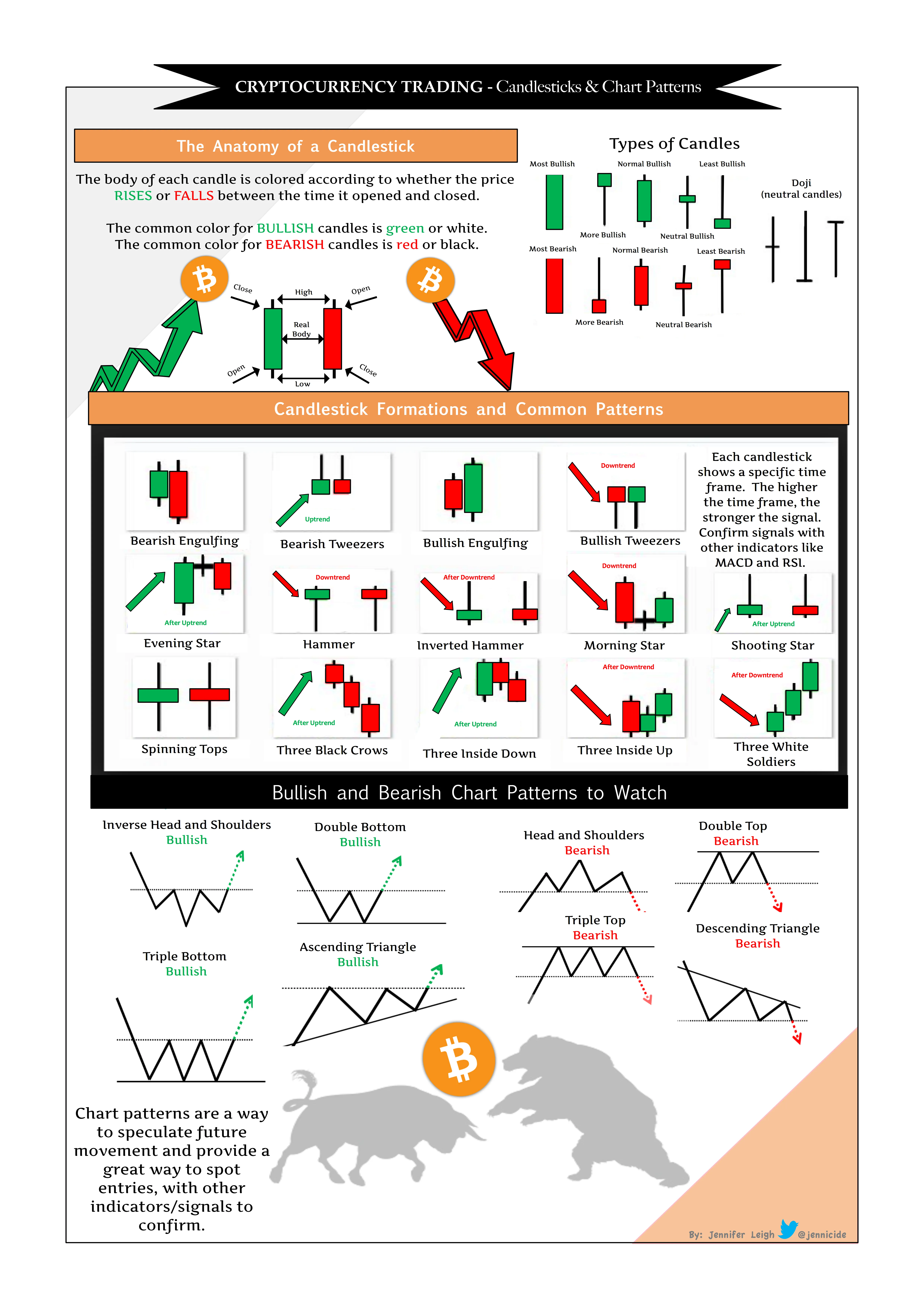
Walk your audience through complex concepts like candlestick patterns or technical indicators by pairing your explanations with clean, simplified screenshots. Sequential visuals complement your narrative perfectly.
- Display a screenshot of a “head and shoulders” pattern.
- Highlight buy/sell zones on the chart in colors matching your podcast branding.
- Provide downloadable screenshots in show notes for deeper study.
3. Create Compelling Visual Quotes & Highlights
Pull out memorable audio quotes and pair them with trade screenshots or summarized trade reports. Share these on social media or your website for maximum engagement.
“Transparency equals trust – and trust equals success in trading.” – from ‘Inside Trading Strategies’ podcast.

Tips for Seamlessly Integrating Screenshots into Your Audio Content Strategy
Optimize for Multi-Platform Sharing
Don’t limit visuals to just your podcast website. Use them in:
- Instagram stories and posts
- Twitter threads
- YouTube video snippets
- Facebook groups and Live sessions
Ensure Branding Consistency
Custom colors, logos, and layouts reinforce brand recognition. Most screenshot generators let you embed these elements effortlessly.
Provide Download Options
Consider sharing the screenshots as downloadable resources in your podcast notes or newsletter. Your audience will appreciate having a tangible takeaway.
Keep It Simple & Clear
Busy, cluttered visuals defeat the purpose. Use clean, uncluttered screenshots – just like those created with Trading Screenshot Generator – to maintain clarity and professionalism.
Real-Life Success Story: How Visual Content Transformed a Trading Podcast
Jamie, a financial influencer with a modest podcast audience, struggled to differentiate his content. Listeners found some jargon confusing and asked for clearer examples. After incorporating customized MetaTrader screenshots in episode summaries and social media, his engagement soared by 40% within three months.
“Seeing the actual trades makes a world of difference,” Jamie says. “Trading Screenshot Generator saved me hours and helped me present my trades like a pro. Now, my audience trusts me more and shares the content widely.”

SEO Best Practices to Boost Your Podcast Visibility Using Visuals
When publishing screenshots alongside podcast episodes, keep SEO in mind:
- Alt-text: Use descriptive, keyword-rich alternate text for images.
- File names: Rename screenshots with relevant keywords before uploading.
- Captions & Descriptions: Write concise descriptions around screenshots that include natural keyword variations related to trading education or signals.
- Structured Content: Use headings, bullet points, and subtopics to organize content clearly.
For example, including phrases like “MetaTrader trade setup screenshot,” “Forex trade analysis image,” or “custom trading screenshots for educators” helps search engines associate your content with relevant queries.
Wrapping Up: Why You Should Start Combining Screenshots and Audio Today
In the fast-evolving landscape of financial content, blending audio with high-quality visual screenshots is no longer optional—it’s essential.
This combination:
- Clarifies complex trading concepts.
- Builds unshakeable trust with your audience.
- Differentiates your brand in a crowded market.
- Drives better engagement and conversion rates.
Tools like Trading Screenshot Generator make it easier than ever to create stunning, professional screenshots that complement your audio content beautifully. Whether you’re educating beginners or showcasing premium signals, visuals paired with your podcast will transform how your message lands.
So why wait? Start creating your impactful podcast visuals today — your listeners (and your brand) will thank you.
Understanding the Importance of Pricing Strategies for Trading Signal Providers
When it comes to selling trading signals, your pricing strategy can make or break your business. Have you ever wondered why some signal providers thrive while others struggle to find paying clients? It often boils down to how they position themselves in the marketplace through their pricing.
Effective pricing for trading signal services is a delicate balance between value, perceived credibility, and the competitive landscape. This article dives deep into how you, as a trading educator or financial influencer, can craft pricing strategies that resonate with your audience and maximize your revenue potential.
Why Pricing Matters More Than You Think
Pricing is not just about numbers; it’s a strong message about your brand and value proposition. Setting your fees too high might scare away potential clients, while pricing too low could cast doubts about your signal quality or reliability.
“A well-thought-out pricing model builds trust and demonstrates professionalism — key factors that turn curious visitors into loyal subscribers.”
Moreover, pricing ties directly to consumer psychology. Traders often look for signals that not only promise good returns but also seem reliable and transparent. This is why incorporating proof of past performance in your marketing materials, including customized MetaTrader screenshots, can reinforce your pricing legitimacy.
Key Challenges in Pricing Trading Signals
- Highly competitive market: Numerous providers compete in a saturated space.
- Varied client expectations: From beginners to advanced traders, needs vary widely.
- Transparency concerns: Traders want clear evidence before paying.
Knowing these challenges sets the foundation for smart, strategic pricing.
Common Pricing Models for Trading Signal Providers
Let’s break down several pricing approaches commonly adopted in the industry, and where they might fit your unique offering.
1. Subscription-Based Pricing
This is the most popular model — clients pay a recurring fee (monthly, quarterly, or annually) for access to your signals. Subscription models provide steady cash flow and allow you to build an ongoing relationship with your audience.
- Pros: Predictable revenue, easier to upsell or offer tiered plans.
- Cons: Requires consistent signal quality and engagement to prevent churn.

2. Pay-Per-Signal Pricing
In this approach, customers pay individually for each trading signal received. It’s appealing for traders wanting more control and less commitment.
- Pros: Attracts cautious clients, aligns revenue with usage.
- Cons: Can complicate forecasting income and may reduce long-term loyalty.
3. Tiered Pricing Plans
Tiered plans offer different levels of access, varying by signal frequency, market coverage, or additional perks like one-on-one coaching or educational resources.
For example:
- Basic Plan: Limited trades, email alerts only.
- Intermediate Plan: Higher signal frequency, real-time notifications.
- Premium Plan: All signals, live webinars, and personal mentoring.
This model attracts a wider audience by meeting diverse needs and budgets.
How to Price Your Trading Signals Effectively
Choosing the right price isn’t just guesswork. Here’s a step-by-step guide:
Step 1: Analyze the Competition
Survey what similar providers charge. Are they offering added value such as educational content, verified trade screenshots, or guaranteed performance metrics? Use tools like Trading Screenshot Generator to showcase your past trades, giving you a professional edge in your marketing materials.
Step 2: Understand Your Target Audience
Who are your ideal clients? Beginners? Experienced traders? Risk-takers? Knowing this helps adjust pricing to what they consider reasonable.
Step 3: Factor in Your Unique Selling Points (USPs)
What makes your signals stand out? Do you offer exceptionally high accuracy, educational support, or timely market commentary? These USPs justify higher prices.
Step 4: Test Different Price Points
Don’t be afraid to experiment with pricing tiers or limited-time offers. Collect data on conversion rates and user feedback to continually refine your strategy.

Step 5: Communicate Value Transparently
When clients understand what they’re paying for clearly, they’re more likely to perceive the price as fair. Use clear language, share sample signals, and display real trade performance.
Leveraging Proof and Transparency to Command Better Prices
One of the biggest reasons traders hesitate to pay high fees for signals is lack of trust. How do you overcome that barrier?
Enter customized trading screenshots. Imagine showing your prospective clients a clean, crisp image directly from MetaTrader — highlighting your past trade entries, exits, and profits — without the clutter or doubts about authenticity. With tools like Trading Screenshot Generator, creating such visuals takes just minutes.
These clear visuals:
– Instill confidence in your signal quality
– Justify premium pricing by showcasing transparency
– Enhance your personal brand as a credible expert
Real traders want more than promises; they want evidence. By sharing verifiable results professionally, you make your pricing appear not only reasonable but genuinely valuable.
Psychological Pricing Tactics to Boost Sales
Now that you have a pricing model, how can you apply psychological techniques to further enhance perceptions?
- Charm Pricing: Prices ending with .99 or .95 often feel more attractive (e.g., $29.99 instead of $30).
- Anchoring: Show a higher-priced option first, so your actual offer feels like a great deal.
- Limited-Time Offers: Creating a sense of urgency encourages immediate action.
- Bundles: Grouping signals with educational resources can increase the perceived value.
For instance, a “Premium Pack” including weekly signals plus monthly webinars at $99 instead of $129 can drive more conversions.
Case Study: From Struggling Provider to Thriving Brand
Consider Alex, a trading educator who initially offered signals at a flat low fee without much evidence. His sign-up rate was poor. After switching to a tiered subscription model, incorporating weekly trading screenshots generated using professional tools, and applying transparent pricing with limited-time discounts, his subscriber base doubled in just 3 months.
The key takeaway? Pricing strategies combined with credible visuals and clear communication create a winning formula.

Summary: Crafting Your Optimal Pricing Strategy
To recap the essentials for trading signal providers:
- Understand your market and audience, adjusting your pricing models accordingly.
- Choose the right pricing approach — subscription, pay-per-signal, or tiered plans.
- Leverage professional, customized screenshots to showcase your track record and build trust.
- Communicate transparently and use psychological pricing tactics to enhance perceived value.
- Continuously test and refine your pricing based on client feedback and conversion analysis.
If you’re ready to elevate your trading signal business, try Trading Screenshot Generator today — it could be the difference between mere website visitors and loyal paying clients.
Unlocking the Full Potential of Your Trading Screenshots
In the world of trading education, influence, and signals, visual proof often bridges the gap between skepticism and trust. But creating and sharing a screenshot once isn’t enough. The real secret lies in repurposing those screenshots across multiple platforms to maximize reach and engagement. Ever wondered how some trading educators seem to effortlessly dominate Instagram, Twitter, YouTube, and even their newsletters with compelling trading visuals? Spoiler: They’ve mastered the art of repurposing.

Why Repurpose Screenshots?
Before diving into the how, let’s first answer the why. The financial trading space is both crowded and competitive. As a trading educator, signal provider, or financial influencer, your personalized trading screenshots serve as your strongest social proof and educational assets. But posting the same screenshot once is like telling a story to just one friend and hoping word spreads.
- Amplify your message — Different platforms have different audiences and consumption habits.
- Boost engagement — Tailored visuals suit platform-specific formats and trends, encouraging more shares and interactions.
- Save time and resources — Repurposing means you don’t have to reinvent the wheel constantly; it’s about creative reuse.
Have you ever felt frustrated because a great screenshot didn’t get the traction you hoped for? Repurposing solves this.
Step 1: Create Clean, Professional Screenshots
Good repurposing starts with quality. Using native platform screenshots can be messy — cluttered chart windows, irrelevant UI elements, or inconsistent branding.
Here’s where tools like the Trading Screenshot Generator shine. They allow you to:
- Automatically capture and customize MetaTrader screenshots
- Remove distractions and focus on key trade setups or results
- Add branded frames or text overlays to highlight key points
- Generate high-resolution images optimized for social media
Imagine you’re a signal provider wanting to share a recent winning trade. Instead of a raw MetaTrader capture cluttered with default indicators, use the tool to present a clean, annotated screenshot that tells a compelling story at one glance.

Step 2: Adapt Your Screenshots for Each Platform
One mistake many make is posting the exact same screenshot everywhere. Spoiler: it rarely works well. Platforms have unique formatting preferences and audience behaviors.
Instagram is all about visual punch and storytelling. You want:
– A square or vertical format (1080×1080 or 1080×1350 pixels)
– Text overlays or graphics summarizing the trade idea
“I turned a single trade screenshot into an Instagram carousel post explaining the setup step-by-step. Engagement skyrocketed by 45%!” — fictional trader Elisa M.
Twitter thrives on punchy, concise updates paired with visuals. Use:
– A horizontally optimized screenshot (1200×675 pixels)
– Follow with a short, engaging comment or hashtag for reach
YouTube
Videos need thumbnails that grab attention. Repurpose your screenshots into custom thumbnails by adding bold titles or arrows pointing to critical trade points. Make sure they:
- Stand out even on mobile
- Match your channel’s branding
Newsletters & Blogs
Your audience who subscribes or reads articles seeks more in-depth insights. Here, screenshots should be:
- Embedded with explanatory captions
- Linked to further analysis or calls to action

Step 3: Tailor the Message – Context is King
A screenshot alone might look impressive but can be confusing without context. Each platform demands a tailored caption or description to engage your audience.
- Instagram: Use storytelling. Share your emotions, lessons learned, or challenges behind the trade.
- Twitter: Be succinct and actionable. Pose questions, share quick takeaways or call for retweets.
- YouTube: Use the screenshot as a hook for deeper educational content.
- Newsletters: Embed the screenshot alongside detailed trade breakdowns and why it matters.
Consider the tale of Josh, a financial influencer. By tweaking his post captions based on platform style, his engagement more than doubled over three months simply through better storytelling aligned with each community.
Step 4: Schedule and Automate Posting
The power of repurposing is magnified when combined with efficient scheduling. Instead of scrambling to create or post content daily, employ tools like Buffer, Hootsuite, or Later to queue multiple posts across platforms. Here’s a useful approach:
- Batch generate your screenshots with the Trading Screenshot Generator tool.
- Create multiple versions tailored for Instagram, Twitter, and other channels.
- Write platform-specific captions or notes.
- Schedule posts for optimal engagement times.
It’s a game-changer especially for educators juggling market hours and teaching schedules. Consistency drives visibility and trust.

Step 5: Track, Analyze, and Refine
Repurposing isn’t a one-and-done strategy. To truly excel, track how your audience reacts to different formats and messages.
Set simple KPIs, such as:
- Engagement rates (likes, comments, shares)
- Click-throughs for links embedded with screenshots
- Follower growth correlated to screenshot campaigns
Leverage native analytics in Instagram Insights, Twitter Analytics, or Google Analytics for newsletters. For example, if your Instagram carousel posts outperform single-image posts, plan to create more in that style.
“Data doesn’t lie. Retooling my screenshot presentation based on performance saved me hours and boosted conversions by 37%.” — fictional trader Anna L.
Bonus Tips for Ultimate Screenshot Repurposing Success
- Brand Consistency: Always include your logo, colors, or fonts to reinforce brand identity.
- Use Annotations: Arrows, circles, and text callouts help direct viewer attention.
- Experiment with Formats: Try GIFs or short videos from screenshots to catch scrolling thumbs.
- Leverage User-Generated Content: Encourage followers to share your screenshots and tag you for social proof.
- Stay Updated: Market conditions and platform algorithms change—adapt your visuals and strategy regularly.
Conclusion: Supercharge Your Trading Influence Starting Today
Repurposing your trading screenshots across platforms is more than a savvy marketing tactic. It’s about expanding your trading story’s reach, building trust, and engaging diverse audiences.
With a few adjustments—clean, professional image creation, platform-specific tailoring, compelling messaging, and smart posting—your single screenshot can become a multi-channel powerhouse. If you’re eager to produce polished screenshots with ease, consider giving the Trading Screenshot Generator a try. It’s designed to save time and amplify your trading brand, no matter your level of expertise.
Remember the story of traders who began repurposing their screenshots not only to educate but to also create a loyal and growing audience. It’s your turn now. Ready to unlock the full potential of your trading visuals?

Understanding the Role of Fake PnL Screenshots in Trading Education
In the fast-paced world of trading, transparency and trust are paramount. Yet, not every educational tool or teaching aid showcases real trading data. Enter fake PnL (Profit and Loss) screenshots—a term that might raise eyebrows, but when used ethically, can be a powerful asset in trading education. But what exactly are these screenshots, and why would educators resort to creating simulated trading visuals? Let’s dive in.

What Are Fake PnL Screenshots?
In essence, fake PnL screenshots are images generated to imitate actual trading results but are created for specific purposes like education, demonstration, or marketing. These aren’t attempts to deceive but rather tools to simplify complex concepts or highlight particular trading strategies in a controlled environment.
Imagine a trading coach trying to explain risk management without having a real-world example that impeccably fits the lesson’s angle. Fabricating a screenshot that portrays the ideal trade setup can greatly enhance understanding—without relying on inconsistent or potentially confusing past records.
Why the Controversy Surrounding Fake PnL Screenshots?
The phrase “fake screenshots” may immediately spark concerns about ethical standards and credibility in the trading community. And rightly so—there’s a dark side where unscrupulous individuals use doctored screenshots to trick novices into thinking they’re buying into verified success stories.
“Transparency builds trust; deception destroys it.” – A maxim every trading educator should live by.
However, the ethical line is drawn when these images are falsely presented as real, verified results. Using simulated screenshots purely for illustrative purposes, coupled with clear disclaimers and educational intent, is a legitimate practice adopted by many reputable instructors.
Ethical Uses of Fake PnL Screenshots in Trading Education
How can educators harness the power of these screenshots responsibly? Here are several ways they can provide value without compromising ethics:
- Demonstrating Specific Trading Strategies: Sometimes real trades are too messy or unpredictable to effectively teach. A custom screenshot allows pinpointing the exact setup, entry, exit, and management rules in a clean visual.
- Visualizing Hypothetical Scenarios: To discuss “what if” cases, such as different outcomes based on varying stop-loss points, simulated images are indispensable.
- Enhancing Course Materials and Tutorials: Not all students can relate to complex raw data. Clear examples crafted visually help bridge that gap.
- Marketing Educational Services Transparently: Signal providers or mentors can use polished, illustrative screenshots to convey what a trade signal looks like, the process of analyzing a chart, or to show demo performance without misleading actual live results.

By incorporating disclaimers and clarifying the simulated nature of these visuals, educators maintain integrity while enhancing learning.
How to Create Ethical Fake PnL Screenshots
With the proliferation of tools that generate realistic trading screenshots, like Trading Screenshot Generator, educators can easily produce high-quality, customized images.
Here are best practices to keep in mind:
- Label Clearly: Ensure the screenshot has a caption or note specifying it’s simulated and used for educational purposes only.
- Avoid Misrepresentation: Do not present these images as real trading results in sales or testimonials.
- Use Realistic but Editable Data: Craft screenshots that reflect plausible trade setups so learners can relate and not doubt the authenticity of lessons.
- Stay Consistent: Align the screenshots with actual teaching content and avoid exaggerating performance.
One might wonder: “Why invest time in fake images when real trade logs exist?” The answer lies in engagement—students retain information better when complex concepts are visualized effectively, even if it means using hypothetical examples.
The Learning Benefits and Increased Engagement
Fake PnL screenshots serve as a bridge between raw data and digestible knowledge. Instead of sifting through confusing spreadsheets or complex trading terminals, these visuals:
- Boost Comprehension: Clean, annotated screenshots highlight crucial elements of a trading setup.
- Motivate Students: Seeing neat, professional visuals can inspire learners to dive deeper.
- Foster Interaction: Educators can create quizzes or discussions around these illustrative examples.
As Alexa, a veteran trading educator, shares: “When I started incorporating simulated trade screenshots into my lessons, my students’ feedback shifted from confusion to confidence.”

Risks of Misusing Fake PnL Screenshots: What Educators Must Avoid
While fake PnL screenshots can greatly aid learning, misuse can have dire consequences:
- Damaged Reputation: Getting caught presenting fake results as genuine can ruin careers and brands.
- Legal Ramifications: Fraudulent marketing claims may lead to lawsuits or regulatory action.
- Loss of Student Trust: Without honesty, students will doubt all future content.
Therefore, a transparent approach in all communications is not just ethical—it’s good business practice.
Real-World Example: Simon’s Journey Using Simulated Screenshots
Simon, a budding forex mentor, struggled to showcase his approach effectively. His real trades were sporadic with mixed results, but he wanted to provide clear examples to his students.
After discovering Trading Screenshot Generator, he began crafting tailor-made screenshots illustrating perfect trade setups he theorized.
He always prefaced these visuals with a simple note: “Simulated for educational clarity.” The response was phenomenal—his students reported more “aha” moments, and Simon’s course enrollments increased by 40% within months.
Conclusion: The Balanced Use of Fake PnL Screenshots
While the trading world rightfully demands authenticity, there is a legitimate, ethical space for using fake PnL screenshots as educational tools. Used with transparency, clear labeling, and honest intentions, these visuals can boost learning, enhance communication, and build stronger trading communities.
If you’re an educator or signal provider aiming to elevate your content, consider exploring the Trading Screenshot Generator. It’s designed to empower you with clean, professional, and customizable screenshots — perfect for responsible education and branding.
Remember, it’s not about faking success but creating a clearer path for your audience to understand the complex world of trading.
Crafting a Compelling Screenshot-Focused Case Study for Your Algo
Have you ever wondered how some algo developers manage to clearly demonstrate the prowess of their trading algorithms with minimal explanation, yet leave a strong impression on potential clients or followers? The secret often lies not just in the performance metrics or backtest results, but in the way the data is presented—especially through crisp, professional screenshots that tell a story at a glance.
In this article, we’ll dive deep into how to build a detailed, screenshot-focused case study that elevates your algorithm’s credibility and appeals emotionally and intellectually to your audience. Along the way, you’ll discover how you can effortlessly create such visuals using a specialized tool crafted for traders and influencers alike: the Trading Screenshot Generator.
Why Screenshots Are Game-Changers in Algo Case Studies
Numbers and stats are important, no doubt. But how often have you skimmed past lengthy tables of results simply because they felt overwhelming or uninviting? Visual evidence, like well-crafted screenshots, changes that dynamic instantly.
- Instant credibility: Screenshots of your trades or backtesting results, clearly mapped out, build trust because they feel authentic and transparent.
- Eases comprehension: A picture is worth a thousand words—especially with complex trading data, a neat visual simplifies understanding.
- Personal branding booster: Customized screenshots let you add your logo, annotations, or branding colors, making your content unique and professional.
Take a moment to think about your favorite trading influencer or educator online. Chances are, their content shines partly because it’s visually engaging and not just plain-text or raw data dumps.
Step 1: Define the Purpose and Scope of Your Case Study
Before jumping into screenshots, clarify what story you want your case study to tell. Here are some guiding questions:
- Are you showcasing the performance of your algo over a particular period?
- Is the goal to demonstrate how your algo identifies certain market setups or conditions?
- Are you trying to teach methodology or provide transparency about decision-making?
For instance, imagine you developed an algorithm tailored to profit during volatile breakout sessions. Your case study could focus on a sequence of breakout trades with annotated screenshots explaining key entry points, stop-loss placements, and outcomes.
Step 2: Gather Your Raw Data and Trade Screenshots
This is where most traders get stuck—trying to sift through piles of trading logs or raw MetaTrader charts that look cluttered or inconsistent. Instead, aim for clean, clear visuals.
- Consistency is key: Use the same timeframes, chart settings, and color schemes for all snapshots so readers find it easy to follow.
- Highlight the essentials: Your trade entry, exit, risk management, and profit/loss zones should stand out.
- Annotate wisely: Use arrows, labels, or subtle highlights to focus attention without overwhelming the viewer.
Enter the Trading Screenshot Generator: In just a few clicks, you can transform cluttered MetaTrader windows into polished, branded images ready for your case study. No Photoshop skills required, and no risk of accidentally exposing sensitive account information.
Pro Tip:
“When I first started documenting my algos, I spent hours manually cropping and editing screenshots. Discovering a dedicated tool that automated that process was a real game-changer—it freed up my time to focus on strategy improvement rather than tedious editing.” – A fictional trader’s testimonial
Step 3: Write an Engaging Narrative to Support Your Images
Each screenshot should be accompanied by a story that contextualizes what the viewer is seeing. Here’s how to keep your narrative compelling:
- Introduce the trade scenario: What market conditions or signals prompted the algo to act?
- Explain the trading logic: Why did the algorithm enter or exit at this point? What indicators or rules were triggered?
- Discuss risk management: How was risk controlled? Mention stop-loss, take profit levels, or position sizing.
- Summarize the outcome: Was the trade successful? What can be learned?
Keep the tone natural and friendly—as if you’re walking a fellow trader through your thought process. Avoid jargon overload; clarity wins every time.
Step 4: Balance Data and Storytelling
While screenshots show visual proof, numbers offer the factual backbone. Integrate concise statistical summaries, such as:
- Win-rate percentages
- Average risk-reward ratios
- Maximum drawdown over the tested period
Make these easy to digest—use bullet points or infographics if possible.
Try to blend data with anecdotal insights—perhaps a trade where the algo behaved unexpectedly and what you learned from it. This humanizes your case study and demonstrates continuous improvement.
Step 5: Design for Readability and Engagement
Formatting matters. Here’s how to make your case study reader-friendly and SEO optimized:
- Use clear headings (
<h2>,<h3>) to break content into manageable chunks. - Incorporate bold, underline, and colored text to highlight keywords naturally.
- Include images regularly to maintain visual interest, and always add descriptive alt-text for SEO and accessibility.
- Insert relevant calls-to-action subtly, to guide readers toward your screenshot creation tool.

Step 6: Share, Gather Feedback, and Iterate
Once your case study is live, don’t just set it and forget it. Share it across relevant trading communities, forums, or social media where your target audience gathers. Solicit feedback on both the content clarity and visual appeal.
Improving your presentation over time based on real audience insights will only strengthen your brand and authority.
Bonus: Automate and Scale Your Screenshot Workflow
As your portfolio of algos and trade documentation grows, manually handling screenshots can become a chore. That’s exactly why services like the Trading Screenshot Generator exist—to scale your output while keeping a professional edge.
Imagine having a seamless process where you feed in your MetaTrader snapshots, apply your signature branding and annotations, and output ready-to-publish images in minutes. That’s the kind of advantage that lets educators, signal sellers, and financial influencers focus on strategy development and audience engagement, not graphic design.
Wrapping It Up: Your Path to a Powerful Algo Case Study
In building your screenshot-focused case study, remember that success lies in more than just numbers and charts. It’s about crafting a narrative supported by authentic, high-quality visuals that communicate confidence and transparency.
To recap:
- Clarify what you want to showcase about your algorithm
- Gather and polish your trade screenshots consistently
- Write clear, engaging narratives that explain your algo’s decisions
- Support visuals with digestible data summaries
- Format your case study for clarity and SEO effectiveness
- Leverage tools like the Trading Screenshot Generator to create stunning screenshots effortlessly
- Iterate based on feedback and scale your workflow
By investing time into visually rich and story-driven case studies, you not only boost trust but also nurture a strong personal brand in the competitive trading space. Ready to start? Give the Trading Screenshot Generator a try today and watch your next case study come to life!
Understanding the Importance of Transparency in Trading Screenshots
In the world of trading education, signal selling, and financial influencing, screenshots from trading platforms like MetaTrader play a pivotal role. They serve as compelling proof of strategy success, market insight, and performance claims. But what happens when these screenshots are manipulated, staged, or even fake? The trust you’ve built with your audience can unravel in seconds. That’s why disclosing fake trading screenshots—or even enhanced visuals—is not just ethical, but a best practice that benefits both creators and consumers alike.

Before diving into how to handle fake or simulated trading screenshots appropriately, it’s crucial to set the stage. Why do creators even use them? And when does customization cross into deception?
Why Use Customized or ‘Fake’ Screenshots?
- Educational clarity: Sometimes, real trades don’t showcase the best learning moments. Custom screenshots allow educators to highlight textbook scenarios.
- Privacy concerns: Traders may want to showcase performance without revealing sensitive account details.
- Brand-building: Polished, clean visuals help create a more professional and trustworthy public image.
But herein lies the tightrope—when these images mimic real trades too perfectly without clear disclosure, they risk misleading viewers.
Best Practices for Fake Trading Screenshot Disclosure
Let’s explore the guidelines that can help you maintain both integrity and impact when presenting potentially staged or enhanced screenshots.
1. Be Explicit and Clear
Transparency is key. A simple note such as “This screenshot is simulated for educational purposes” or “This image has been customized to illustrate a hypothetical trade setup” empowers your audience to understand exactly what they are seeing.
“I once saw a signal provider using screenshots that looked fabulous, only to realize later that the trades were backdated and edited. That clarification changed everything. I appreciated the honesty, even if the strategy wasn’t perfect.” — Sarah M., Retail Trader
Disclosures shouldn’t be hidden away in tiny footnotes or buried in end credits. Using contrasting colors or bold fonts can help these messages stand out, protecting your reputation and boosting credibility.
2. Use Descriptive Captions
It’s helpful to accompany screenshots with detailed captions:
- What trade setup is being shown?
- Is this a real trade or a simulated example?
- What lessons or insights does this screenshot illustrate?
These context clues make the image informative rather than purely promotional.

3. Keep Your Audience’s Trust First
The financial education industry thrives on trust. With misinformation and “hype” saturating social media, your audience will reward authenticity and openness. Consider this:
- Be honest about your track record.
- Don’t exaggerate performance.
- Disclose when a trade or setup is hypothetical.
These small acts of candor build long-term loyalty and minimize costly legal or reputational risks.
4. Choose the Right Platform for Sharing
Where you display your screenshots matters. Public forums, paid subscription platforms, personal blogs, newsletters—all come with different expectations of transparency. For instance:
- On social media: Quick disclaimers in captions or image overlays are essential.
- In paid courses: Detailed elaborations on the nature of screenshots deepen trust.
- For marketing campaigns: Use a clear disclaimer prominently.
Failing to do so can cause misunderstandings and harm your community’s perception.
How Technology Can Aid Authenticity in Screenshot Sharing
Crafting authentic-looking screenshots is no longer a technical headache thanks to tools designed specifically for traders. Trading Screenshot Generator is a shining example—allowing educators and signal sellers to create clean, customized MetaTrader screenshots with just a few clicks.
With integrated options to add disclosure notes, mark screenshots as simulated, or simply present trades without sensitive account data, this tool empowers users to share convincingly professional visuals while staying ethical.

Why You Should Consider Such Tools
– Protect sensitive data while still showing proof of concept
– Quickly generate educational or promotional content
– Embed mandatory disclaimers or disclosures visually on the screenshot
– Enhance branding with custom themes and captions
In a world where credibility can make or break a financial influencer, investing in smart tools that facilitate transparency is a smart move.
Common Pitfalls to Avoid When Using Fake Trading Screenshots
While the benefits are clear, it’s equally important to steer clear of these common mistakes:
- Ambiguous disclosures: Vague or minimal disclosure can read as misleading.
- Over-polishing: Creating unrealistic performance can backfire severely.
- Ignoring legal regulations: Check your regional laws regarding financial advertising and consumer protection.
Pro Tip: Regularly revisit your disclosures as regulations evolve, and keep your community informed.
How Transparency in Screenshots Leads to Better Conversions
It might sound counterintuitive, but being upfront about simulated or enhanced screenshots can actually boost conversions and trust. Why? Because today’s trading audience is savvy and skeptical.
Here’s what happens:
- Reduces buyer apprehension: Clear disclosures help people make informed decisions.
- Sets realistic expectations: Avoid the “too good to be true” trap.
- Builds your brand as reliable: Honesty stands out.
This trust translates into engagements, subscriptions, and long-term followers, translating to a sustainable business.

Wrapping Up: Ethical Sharing in the Age of Digital Trading Content
Let’s face it—screenshots are the currency of credibility in trading education and influence. But with that power comes great responsibility. Whether you’re showing real past trades, hypothetical setups, or combining both, being upfront is non-negotiable.
If you want to produce professional, customizable screenshots tailored for transparency and brand-building, give Trading Screenshot Generator a try. It’s a modern approach that aligns perfectly with the best practices outlined above.
Remember: Your audience values authenticity—make it part of your brand DNA.
Unlocking the Power of A/B Testing with Fake Trading Screenshots
Imagine you’re launching a new landing page for your trading educational service. You’ve crafted compelling copy, designed an inviting layout, and added testimonials. Yet, your visitors bounce, and conversions stubbornly stay low. What’s missing?
In today’s competitive trading ecosystem, visual trust signals can make or break your funnel. That’s where the clever use of fake trading screenshots becomes a strategic weapon to A/B test landing pages effectively.
Why Use Fake Trading Screenshots For A/B Testing?
First, let’s clarify: fake trading screenshots aren’t about deception; they’re about creating realistic, controlled visuals to test what resonates with your audience.
- Cost-effective and fast: No need to wait weeks or months for genuine trading data to accumulate.
- Controlled variables: You decide exactly what performance stats, trade types, and annotations to display.
- Increase authenticity and trust: Custom screenshots look professional and tailored to your brand.
For educators, signal service providers, and financial influencers, these visuals transform abstract claims into concrete, relatable proof, making visitors more likely to convert.
Understanding A/B Testing in the Trading Niche
A/B testing or split testing involves showing two versions of a landing page to different visitor segments to determine which performs better. But when your product is knowledge, signals, or mentorship, how do you demonstrate value?
Traditional text or stock photos won’t cut it anymore. Traders want to see actual trade results, setups, and performance snapshots before committing.
Here’s the catch: real screenshots can leak sensitive data or highlight imperfect results. That’s why fake, yet authentic-looking screenshots cultivated through tools like the Trading Screenshot Generator are a game-changer.
Step-by-Step Guide to A/B Testing Landing Pages Using Fake Trading Screenshots
Ready to dive into testing? Follow these proven steps to leverage fake trading screenshots effectively.
1. Define Your Hypothesis
Start with a question. For example:
- “Will showcasing a winning trade improve sign-up rates by at least 10%?”
- “Does including a screenshot with annotated trade entry and exit points increase trust?”
- “Is performance data from a scalping system more persuasive than swing trade screenshots?”
Without a clear hypothesis, your test data may confuse more than enlighten.
2. Create Two Versions of Your Landing Page
Version A (the control) uses your existing layout and content, maybe including generic images.
Version B features the fake trading screenshot—crafted with your desired metrics, trader name, instrument, and timeframe—to complement the sales copy.

3. Use a High-Quality Screenshot Generator Tool
The secret sauce here is realistic, professional visuals that look credible. The Trading Screenshot Generator provides an easy interface to customize MetaTrader screenshots with:
- Custom trade results including profit, lot sizes, and timestamps
- Visual annotations explaining trade logic
- Branding elements like logos or personalized trader aliases
- Clear, uncluttered chart setups
This level of control ensures your screenshots align perfectly with your landing page narrative.
4. Run Your A/B Test with Robust Tracking
Utilize tools such as Google Optimize, Optimizely, or VWO to split traffic evenly and monitor key metrics:
- Conversion rate (sign-ups, purchases, etc.)
- Bounce rate
- Time on page
Remember, statistical significance is vital. Aim for enough traffic to confidently determine which version wins.
5. Analyze Results and Iterate
Once your test concludes, dig into the data:
“Was the version with the fake trading screenshot significantly more effective? Did visitors engage longer or proceed to sign up more often?”
If yes, you’ve uncovered a powerful trust-building element. If not, consider tweaking the screenshot content (e.g., trade types, visual style) and rerunning the test.
Real-World Anecdote: How A Trading Educator Boosted Conversions by 35%
Take the example of Sophie, a trading mentor who struggled to capture attention from hesitant beginners. By introducing clean, annotated fake screenshots showing her hypothetical but plausible trades on her landing page, she created a sense of professionalism and transparency.
Within two weeks of testing, Sophie saw a 35% increase in newsletter sign-ups and a boost in trust metrics collected via surveys. The screenshots became a central conversation starter in her webinars and social media posts, reinforcing her credibility.
Best Practices When Using Fake Trading Screenshots
- Maintain Ethical Transparency: Avoid outright deception. The goal is to illustrate potential, not fabricate impossible returns.
- Match the Screenshot to Your Audience: Scalpers might prefer quick intra-day setups, while swing traders appreciate longer-horizon charts.
- Optimize for Mobile: Ensure screenshots look crisp and readable on phones and tablets.
- Complement with Educational Content: Use screenshots as teaching tools, not just sales props.
- Keep it Simple: Overly busy charts confuse more than convince. Focus on clarity.
How Fake Trading Screenshots Enhance Your Brand’s Storytelling
Beyond A/B testing, these visuals help you tell a compelling story: from explaining trade rationale to showcasing strategy diversity. Combine screenshots with narratives, video walkthroughs, and live Q&A to build an engaged community of followers.

Plus, the Trading Screenshot Generator empowers creators to develop a consistent visual language, strengthening brand recall.
Common Questions About Using Fake Trading Screenshots
Isn’t it misleading to use fake trade screenshots?
Not if handled responsibly. Transparency about hypothetical examples and educational purpose mitigates ethical concerns. It’s about illustrating concepts, not guaranteeing profits.
Can I use screenshots from other platforms?
MetaTrader is a gold standard due to its widespread adoption and clean interface, but some creators adapt screenshots from TradingView or ThinkorSwim. The key is customization and quality.
Do these screenshots work in paid ads?
Yes, but always adhere to platform advertising guidelines and avoid exaggerated performance claims.
Conclusion: Elevate Your Landing Pages with Smart Visual A/B Testing
Using fake trading screenshots for A/B testing is a clever way to gather actionable insights without the wait or risk of revealing sensitive data. They serve as trust anchors that make your educational or signal service landing pages more authentic, engaging, and convincing.
By incorporating realistic, annotated images tailored to your audience’s preferences, and testing their impact systematically, you can optimize conversions and build a lasting brand presence.
Curious to start crafting your own customized trading screenshots? Explore the possibilities at the Trading Screenshot Generator and see firsthand how professional visuals can transform your landing page performance.
Why Order Book Analysis Matters in Trading
If you’re diving into the depths of financial markets, you’ve probably heard the buzz around order book analysis. But why is it such a pivotal tool for traders and analysts alike?
Simply put, the order book provides a live snapshot of all buy and sell orders for a particular asset. By observing it, traders can gauge market sentiment, potential support and resistance levels, and even anticipate price movements before they happen.
Imagine standing at the edge of a busy marketplace, watching buyers and sellers negotiate in real-time. The volume, intensity, and direction of these negotiations offer clues about what’s likely to unfold next. That’s exactly what an order book analysis helps you visualize in the digital trading world.

Challenges of Sharing Order Book Insights
Order book data is inherently dynamic. Prices move quickly, orders get filled or canceled, and the depth of the book often changes by the second. Capturing this fluidity for educational purposes or social sharing is no small feat.
Many traders struggle with presenting their order book analysis clearly to their students, clients, or followers. Screenshots of raw platforms often come with cluttered interfaces, extraneous tabs, and elements that distract from the core message.
This is where purpose-built tools become crucial.
“You can’t expect your audience to grasp the intricacies of order book data if your visuals don’t communicate effectively.”
— Emma Taylor, Professional Trading Educator
How High-Quality Screenshots Elevate Order Book Analysis
Embedding clean, customized screenshots in your content can be a game changer. Why?
- Clarity: Highlight specific price levels, order clusters, or anomalies with callouts and annotations.
- Trustworthiness: Professional-looking visuals suggest transparency and bolster your credibility.
- Engagement: Visual aids make complex concepts easier to digest, keeping readers hooked.
- Branding: Tailored screenshots reinforce your personal or business brand with consistent styling and logos.

Think about Sarah, a trading mentor who struggled to explain her strategies using the default screenshots from MetaTrader. Once she started using enhanced screenshots, her students reported better comprehension, and her social media engagements skyrocketed.
Best Practices for Showcasing Order Book Analysis Using Screenshots
When sharing screenshots of order book data, consider the following guidelines for maximum impact:
- Focus on Relevant Data: Crop or highlight the sections that illustrate your key points. Don’t overwhelm viewers with the entire interface.
- Use Annotations: Arrows, circles, and text boxes can direct attention and clarify your analysis.
- Maintain Consistency: Use the same visual style for all your screenshots to build a recognizable brand aesthetic.
- Keep It Updated: Always ensure your screenshots reflect the most recent data to demonstrate relevance and accuracy.
- Add Context: Accompany visuals with concise explanations — numbers alone rarely tell the full story.
Leveraging Tools Designed for Traders: Trading Screenshot Generator
Manually capturing and editing order book screenshots can be tedious and time-consuming, especially when dealing with live trading platforms like MetaTrader.
That’s why innovative solutions like the Trading Screenshot Generator exist to streamline this process. This web tool allows educators, signal providers, and financial influencers to effortlessly generate clean, customizable screenshots from MetaTrader in just a few clicks.
Imagine this scenario: You’ve just identified a fascinating order book setup that perfectly illustrates market dynamics. Instead of fumbling through screenshot edits or relying on generic images, you use the Trading Screenshot Generator to create a polished, branded visual instantly. The result? Enhanced trust, better engagement, and a professionally crafted image that elevates your authority.
Examples of Effective Order Book Screenshot Use
Order book screenshots can serve multiple purposes depending on your audience and goals:
- Educational Content: Tutors can highlight how to interpret order flow and liquidity zones.
- Performance Showcases: Signal sellers might display past orders with exact price levels and timing to prove reliability.
- Market Commentary: Financial influencers can provide real-time analysis backed by vivid visuals.
Take this breakdown from a popular trading channel where a beautifully customized screenshot of the order book helped clarify a complex price manipulation example. The combination of visuals and expert commentary resulted in widespread acclaim and an influx of new subscribers.
SEO Tips: Optimizing Your Content Around Order Book Screenshots
While crafting compelling content is crucial, don’t overlook the power of SEO to ensure your knowledge reaches the biggest possible audience.
Here are some handy tips:
- Integrate Long-Tail Keywords: Use phrases like “order book analysis screenshots,” “MetaTrader order book visuals,” or “custom trading screenshots” naturally in your text.
- Optimize Image Alt Text: Include descriptive keywords related to order book analysis for each screenshot.
- Use Headers Strategically: Break down content with
<h2>and<h3>tags featuring primary and secondary keywords. - Link to Authoritative Sources: For example, referencing MetaTrader’s official site when discussing platform features.
- Encourage Engagement: Ask readers questions, invite comments, or suggest sharing to improve dwell time.
Wrapping Up: The Power of Visual Storytelling in Trading
The financial markets can often feel like a maze — complex and fast-moving. But visuals, especially well-crafted order book screenshots, act as signposts guiding traders toward informed decisions.
Whether you’re an educator trying to make your lessons clearer, a signal seller wanting to demonstrate transparency, or an influencer aiming to build a trustworthy brand, investing time in creating quality screenshots pays dividends.
Ready to take your order book analysis presentations to the next level? Discover how the Trading Screenshot Generator can simplify and enhance your visuals today.
Why Screenshot-Based Scenario Planning is a Game-Changer for Traders
Imagine Sarah, a trading coach with a loyal online following. Every week, she painstakingly analyzes charts, jots down potential setups, then shares dense, text-heavy PDFs with her community. The engagement isn’t great. Her followers often ask for clearer visuals, “Can you show me what you see on MetaTrader?” Her response? A clunky screen recording or, worse, a messy screenshot taken on the fly, riddled with irrelevant info.
Welcome to a new era: *screenshot-based trading scenario planning*. This approach harnesses clean, professional visuals carefully crafted directly from MetaTrader charts to illustrate trading setups, decision points, and results. For educators, signal providers, and financial influencers who rely heavily on clarity and trust-building, this method is reshaping how trading knowledge is conveyed.
Why does this matter? Because trading is as much about communication as it is about data. Visuals grounded in real trading environments create relatable, trustworthy content that drives better understanding and client confidence.
The Foundations of Trading Scenario Planning
At its core, scenario planning in trading is the process of preparing for various market possibilities based on technical and fundamental factors. This can include:
– Anticipating price movements based on chart patterns
– Setting up potential entry and exit points
– Considering risk management tactics like stop losses and take profits
– Evaluating different market conditions (volatile, sideways, trending)

Typically, traders document these scenarios in journals or flowcharts. But what if you could visualize each scenario *exactly* as it appears on your MetaTrader platform, annotated and customized to your teaching style?
This is where screenshot-based planning shines. It allows you to:
- Present complex scenarios visually, reducing cognitive load for learners
- Build compelling narratives around your trade ideas
- Gain audience trust by revealing the actual trading environment
Enhancing Learning Through Visual Storytelling
Take a moment to think about how you consume knowledge. Would you rather read a paragraph describing a double-top pattern or see a crisp screenshot highlighting that very pattern with key levels marked?
Visual storytelling taps into _how humans best retain information_. Using annotated screenshots enables traders and educators to illustrate not just the “what,” but also the “why” and “how” of trading setups.
Practical Steps to Creating Effective Trading Scenario Screenshots
Here’s how you can start leveraging screenshot-based scenario planning to elevate your trading communication:
1. Identify Key Scenarios Worth Showcasing
Focus on trades or setups that best demonstrate your strategy or lessons. Examples could be:
– Breakout confirmation in EUR/USD
– Retracement zones on Gold charts
– Risk management in volatile markets
2. Use a Dedicated Tool to Capture Clean Screenshots
Taking screenshots manually often includes irrelevant info like market watch lists, alerts, or UI clutter. A tool specialized for traders, like Trading Screenshot Generator, lets you selectively capture your chart area with annotations and custom branding.
3. Annotate Thoughtfully
Highlight crucial elements:
– Entry and exit points
– Support and resistance zones
– Indicators or patterns involved
This turns a static image into a mini-lesson.
4. Group Similar Scenarios for Pattern Recognition
Creating a library of screenshot-based case studies helps students or subscribers recognize patterns and consequences more easily.
5. Publish and Engage
Use these visuals in blog posts, newsletters, or social media to drive engagement. People *love* seeing behind-the-scenes insights.
Tips to Maximize the Impact of Your Trading Screenshots
To really stand out, consider these expert tips:
- Keep it clean: Avoid overloading the image with too much text or graphics.

- Consistency matters: Use the same color schemes and labeling conventions for easier recognition.
- Brand it: Incorporate your logo or watermark discreetly for authenticity.
- Update regularly: Share fresh scenarios to stay relevant in fast-moving markets.
- Invite interaction by asking questions related to the scenario—”What would you do differently here?”
Why Trading Educators and Influencers Trust Screenshot Generators
As seen in countless testimonials across trading communities, quality visuals can make or break reputation in the digital age. Screenshots done wrong can erode trust if they appear embellished or unclear.
Using tools crafted for traders ensures:
– **Authenticity:** Show exactly what you see on MetaTrader
– **Efficiency:** Generate polished images within minutes, freeing up your time
– **Customization:** Tailor screenshots to your unique teaching formulas
By enhancing presentation quality, you’re subtly increasing:
– Audience engagement
– Conversion rates for your lessons or signals
– Your status as a trusted authority
> *“Before I started using specialized screenshot tools, my students often misunderstood my trade setups. Now, the clarity in my visuals cuts down questions and boosts course sign-ups.”* — Trading Coach Emma T.
Bridging the Gap Between Theory and Practice
There’s a common hurdle in trading education: transforming theoretical knowledge into actionable practice. Screenshots create a powerful bridge here by demonstrating real-world application.
They allow learners to observe how technical indicators behave live, how price reacts to news events, or how a stop loss would have protected capital in a volatile scenario.
Enhancing Signal Seller Credibility
Signal providers especially benefit. Delivering transparent, screenshot-backed signals makes your service more trustworthy:
– Clients can visually confirm trade entries
– You reduce complaints caused by confusion
– Your signals gain a competitive edge in a crowded marketplace
Wrapping Up: Make Your Next Trading Scenario Shine
Creating screenshot-based trading scenarios is more than just a nicety—it’s a strategic move to communicate your expertise authentically and compellingly. Whether you’re an educator, a signal seller, or a financial influencer, the quality of your visuals speaks volumes about your professionalism.
If you want to *elevate your trading presentation effortlessly*, explore a tool purpose-built for this very need: Trading Screenshot Generator. It’s a small step that can lead to bigger trust, better engagement, and stronger brand recognition.